Which products are affected? ESP-SPAC-CAM1 – Cam V2.0 software package (
LenzeCamControl1V0200.lib library)
What happens?
When the touch probe synchronisation is activated at the L_CamSetXAxisVelocity function block, an interrupted touch probe synchronisation continues to be executed and a compensating process is initiated in the master value string following the drive. It is not possible to reset/delete the touch probe correction travel (L_CamSetXAxisVelocity.dnXDifference_p).
When does the problem occur?
The problem occurs if a touch probe correction in progress is interrupted via the following signals:
L_CamSetXAxisVelocity.nTpMakeUpLeeway_n = 0
or L_CamSetXAxisVelocity.bEnable = FALSE.
If the touch probe correction is reactivated and no further touch probe events are identified, the touch probe residual distance (residual distance as indicated via L_CamSetXAxisVelocity.dnXDifference_p) is corrected.
Possible diagnostics?
If the touch probe correction is deactivated, the L_CamSetXAxisVelocity.dnXDifference_p output variable indicates a value that does not equal 0. When the touch probe synchronisation is reactivated, a compensating process is initiated in the master position.
Short-term measures/recommendations?
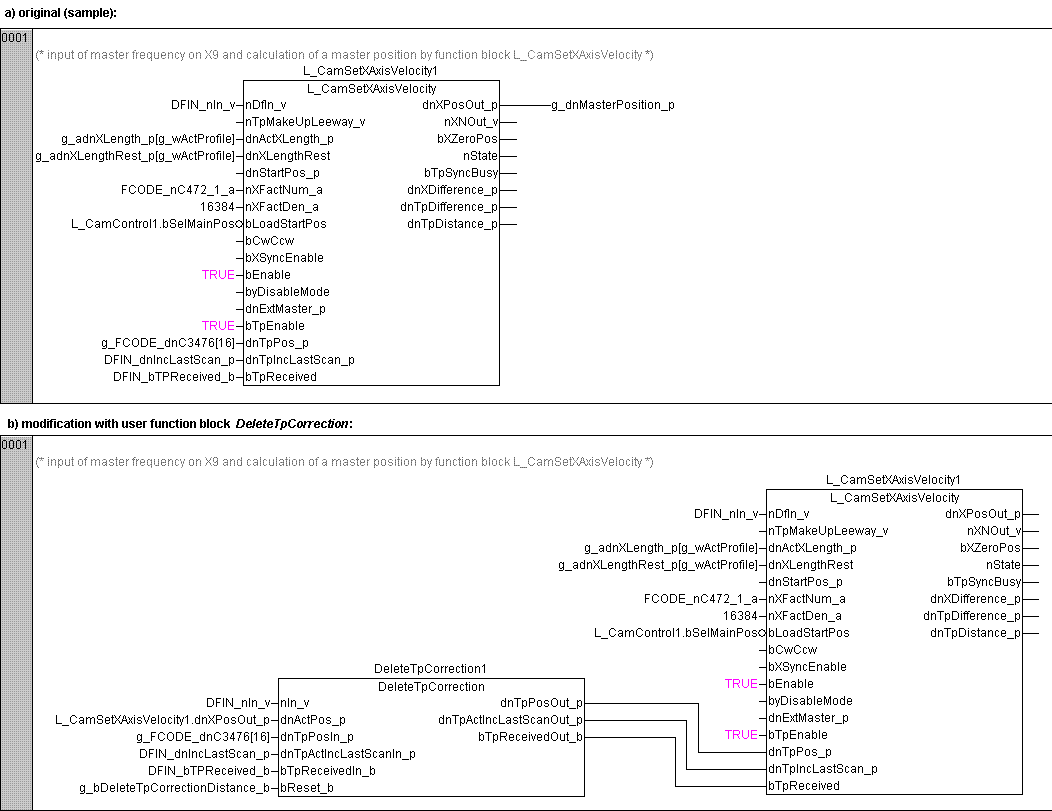
Interconnect the touch probe interface of the L_CamSetXAxisVelocity function block as shown below.
Evaluation:
In practice, the touch probe residual distance is very rarely deleted. Especially in the case of cyclic touch probe signals (e. g. print marks in regular intervals) and the option to compensate the touch probe differential travel in the master value string in a controlled way, it is not necessary to abort a corrective movement.
However, if this functionality is still requested by the user, the program extension mentioned under Short-term measures/recommendations can be used.