Newsroom
Press releases
Aktuelles
Blog
Trade fairs and events
Newsletter
Careers
Current vacancies
Downloads
Engineering apps
Engineering data
Engineering Software tools
Product-related Application Knowledge Base articles
Product-related documentation
Certificates and declarations
Online Tools
Online Documentation
EASY Product Finder
Drive Sizing
Machine Design
CAD Configurator
M-n curves
Smart Conveyor Calculator
Contact
Deutschland (Germany)
Deutsch
English
Change country
Products
IIoT
Controllers
Inverters
Three-phase gearmotors
Geared servo motors
Motors
Gearboxes
Accessories
Engineering tools
EASY System Designer
Engineering tools
Lenze FAST Application Software
Lenze Selection
Solutions
Industries
Automotive industry
References
Automotive industry
Battery Production
Converting and printing industry
References
Converting and printing industry
Vehicle washing
Airport logistics
Glass, stone and ceramics
Wood working
Plastics industry
Courier Express Parcel
Warehouse logistics
Food and beverage industry
Metalworking
Textile industry
References
Textile industry
Packaging industry
References
Packaging industry
Industries
Applications
Horizontal conveying
Refrigeration engineering and heat pumps
Ventilation equipment
Pumps
Recycling and Bulk Materials
Storage and retrieval machines
Robotics
Applications
References
Converting and printing industry
BST
Donghang Graphic Technology Inc.
DURST Group
D.W. Engineers
GIC
MAAN Engineering
Mendel RG Systems
Nikelman Printing press
Relinquo Automation Pvt. Ltd.
Suddha Machineries and Industries PVT LTD
Converting and printing industry
Airport logistics
Courier, Express & Parcel
SAIET ENGINEERING
Courier, Express & Parcel
Warehouse logistics
bonArea
E80 Group
N.E. ENGINEERING
Stöcklin High-bay warehouse
Vectron
Witron Warehouse logistics
Warehouse logistics
Ventilation and air-conditioning technology
CaptiveAire
Elektror
HB-Therm
TOMEXCO
Ventilation and air-conditioning technology
Recycling and Bulk Materials
Komptech
Recycling and Bulk Materials
Textile industry
Dilmenler
Gilbos
MBK and DMS Dilmenler
Menzel Compact washer
Monforts Textile machine
Nomaco Nonwoven machines
nsc.n schlumberger
Picanol Weaving machines
Pro-SMH
Texpro
Trigema and Xetma Vollenweider
Zimmer Austria
Textile industry
Packaging industry
Citus Kalix Packaging machine
DMK
Fricke Abfülltechnik
Kletec Egg processing machines
MAKRO MAKINA
Mondini
Mpac
Pattyn
PAYPER
TechNikkels
Wolf Packaging machines
XOX Retrofit extruder
Packaging industry
Further industries
Bauer
FOM INDUSTRIE
HEGLA New Technology
KABTEC Test systems
Lisec
MFL
Schelling Sawing center
Weinig Grecon
Further industries
References
Brand Labeling
Systems
Our hardware
X4 Remote
Functional safety
Our hardware
Our software
SMART Engineering apps
Our software
Systems
Mechatronics
Mechatronic Competence Campus
Decentralized Drive Packages
Energy efficiency
Mechatronics
Solutions
Services
Repair and spare parts service
Training
On-site training
E-Learning
Online training
Training
Engineering services
Product-Lifecycle-Management
Performance Partner services
Cyber Security
Cyber Security Statements
Cyber Security
Software downloads
EASY Engineering tools
Engineering Apps
Engineering data
Software downloads
Knowledge base
Application Knowledge Base
Product-related documentation
Company-related documentation
Knowledge base
X4 Remote Support
Services
Support
Company
Group of companies
Our approach
Promise of quality
Industry 4.0
Our approach
Our responsibility
Employee responsibility
Social responsibility
Our responsibility
Our corporate culture
Our management
Our history
100 years Elisabeth Belling
Our history
Group of companies
Global presence
Sustainability
Compliance
Newsroom
Press releases Lenze Group
Topicals
Blog
Trade fairs and events
Newsletter
Newsroom
Careers
Current vacancies
Current vacancies Germany
Current vacancies in Poland
Current vacancies Benelux and UK
Current vacancies Switzerland
Current vacancies USA
Current vacancies China
Current vacancies
Working at Lenze
We are Lenze
Offers for students
Careers
Global Procurement
Company
Deutschland (Germany)
Deutsch
English
Change country
Home
Application Knowledge Base
Article
Accelerate the launch of EASY Starter
Accelerate the launch of EASY Starter
Question:
How can the starting performance of the EASY Starter be accelerated?
Answer:
The startup of the EASY Starter can be accelerated by defining the
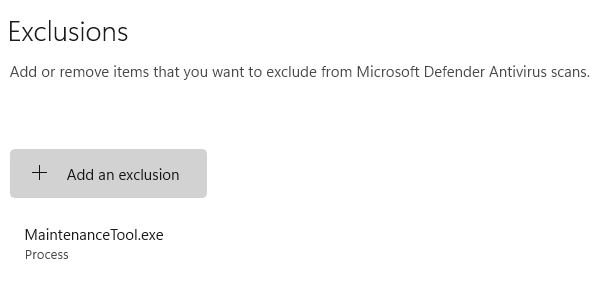
"MaintenanceTool.exe" process
as an exception in Windows Virus and Threat Protection.
Before defining this exception, check with your IT department!
To configure the settings, proceed as follows:
Open the dialog box for configuring 'Windows Security'
Click on 'Virus & threat protection'
Under the 'Virus & threat protection settings' section, click on the 'Manage settings' link.
Under the 'Exclusions' section, click on the 'Add or remove exclusions' link.
Click on '+ Add exclusion'.
Select 'Process' from the drop-down list and enter 'MaintenanceTool.exe' as the process.
[Automatic Translation]
URL for linking this AKB article:
https://www.lenze.com/en-de/go/akb/202300251/1/
Meta data
Taxonomy: EASY Starter
AKB-ID: 202300251
Last update: 2026/02/25
Category: FAQ, Tips and Tricks
Lenze reserves the right to change information on this page at any time. Any liability for the accuracy of the information is excluded.
©
Change location
Imprint
Privacy policy
Terms of use
Contact