Resolved as of:
PLC Designer V3.28 and later
Behavior of the new version:
The behavior described no longer occurs
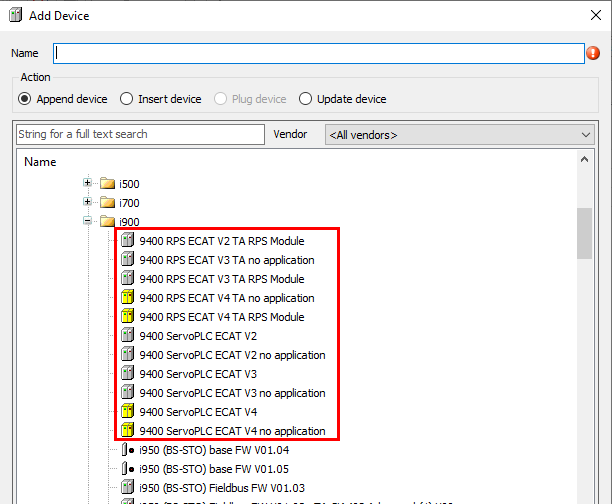
Description of the behavior:If Lenze devices are to be connected as EtherCAT participants to the EtherCAT master of the Lenze controller using the "Connect Device" dialog, the "i900" folder contains not only the i900 servo inverters (or their device descriptions) but also other Lenze drive controllers (e.g., the 9400 servo inverter). These drive controllers are therefore not in the correct folder.
Under what conditions does this behavior occur?
When using older device descriptions or installing EASY Package Manager packages (prior to V3.22).
Affected products:
PLC Designer version 3.22 and later
Short-term measures:
If you cannot find a device or its device description in the corresponding folder of the "Attach Device" dialog or in the device repository, check whether the missing device is located in the "i900" folder.
Starting with PLC Designer V3.25, the problem can be resolved as follows:
1. Exit PLC Designer.
2. Open the Lenze Package Manager, delete all packages under "Device Descriptions/Tool Version-Dependent," and then download them again from the server.
3. Start PLC Designer V3.25 or higher. The packages will now be reinstalled.
Assessment/Recommendations:
Due to this functional limitation, attaching certain Lenze drive controllers to the EtherCAT master of the Lenze controller is difficult in the PLC Designer project.
[Automatic Translation]