GDC is closed during storage in a non-volatile mode (remedied from V4.7)
Remedied from?
GDC 4.6.1 and GDC easy 4.5
Behaviour of the new version?
When closing the drive window in GDC (by clicking on the X- symbol) the selection of a storage in a non-volatile mode can be acknowledged by clicking the button 'Accept' occurring in the following window.
Which products are affected?
GDC 4.6.1 and GDC easy 4.5
What happens?
The error message 'gdc32.exe has errors...' is indicated in GDC. After closing this window GDC is stopped.
When does the problem occur?
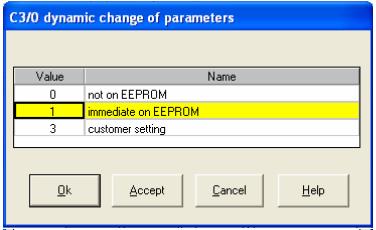
When closing the drive window and if storage in the non-volatile mode is selected in the following window. Afterwards, another window in which a value is assigned to code C0003 occurs. If this value is acknowledged by clicking the button 'Accept' the error mentioned above occurs.
Possible diagnostics?
The problem described before can occur if a device has been parameterised by using the GDC software and the drive window is closed after completion of the parameter setting by clicking the X-symbol. The query for saving the parameter set is acknowledged with 'yes'. If afterwards in the following window a desired value is selected under code C0003 and the selection is acknowledged by clicking the button 'Accept', the error occurs.
Short-term measures/recommendations?
The error does not occur if in the last window the 'OK' button is clicked instead of the 'Accept' button.