Fixed as of:
i550 cabinet (as of FW 6.6 or 7.6)
Behavior of the new version:
Multiple i550 cabinets can now be updated simultaneously via the controller. No malfunctions occur during this process.
Description of the behavior:
The firmware update for the Lenze inverters does not complete.
On the i550 cabinet, the control panel displays “KP.ERROR”
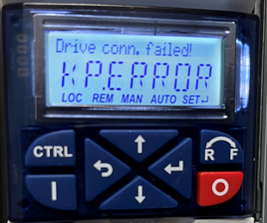
The controller’s log displays one or more of the following error messages:



Conditions under which the behavior occurs:
A firmware update from firmware version 6.5 or 7.5 is being performed simultaneously on multiple i550 cabinets.
Affected products:
c430 controller with i550 cabinet
c520 controllerwith i550 cabinet
c550 controllerwith i550 cabinet
Short-term measures, recommendations, evaluation:
All drives, with the exception of the i550 cabinet running FW 6.5 or V7.5, should be connected to EtherCAT. The update can then be performed via a new, empty PLC project for the controller (the project contains only the EtherCAT configuration).
All i550 cabinets running V6.5 or V7.5 must be updated manually using the EASY Firmware Loader and a USB connection.
Alternatively, update only one i550 cabinet at a time via the controller.
[Automatic Translation] [Automatic Translation]
