What happens?
An exception occurs when performing an online change.
The following message appears in the logbook:
*EXCEPTION* [<excpt>OmittedCycle watchdog</excpt>] occurred: App=[<app>Application</app>], Task=[<task>Task-Name</task>]
When does this behaviour occur?
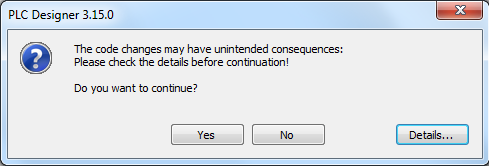
The behaviour may occur if the following dialog is displayed during an online change:
If the above dialog appears during an online change, the online change may inter alia have the following unintended effects (see <Details...>):
Variables are initialised
Pointers used in the PLC logic point to an invalid location
An exception (task overflow) occurs (see above description)
The dialog may also appear if only minor changes were made.
Which products are affected?
PLC Designer from V3.0
Short-term measures:
If the above-displayed dialog appears, abort the online change and bring your machine into a safe state. After that, clean your application and perform a completely new download.
Evaluation/recommendations:
When the above dialog is displayed, an online change may have unintended consequences. In this case, Lenze recommends that the online change is not performed.