Remedied from?
GDC V4.10 SP1 and GDCeasy V4.10 SP1
Behaviour of the new version?
Thanks to the installed Service Pack 1 a GDC file can be opened by doubleclick without restrictions. This is also possible if the pdb file used in the GDC file is assigned in the second search path for pdbs.
Which products are affected?
GDC V4.10 and GDCeasy V4.10
What happens?
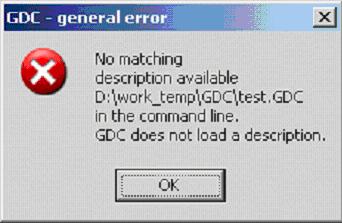
The following error message is indicated when a GDC file is doubleclicked (see graphics attached).
The 2nd search path (customer-specific) for the pdb file is indicated by the red frame in the error message mentioned above.
When does the problem occur?
Different device description files (pdb files) are required in order to ensure that the different Lenze software tools can identify the devices connected.
According to default, these pdb files are filed in the pdb directory under the corresponding Lenze software tool. Thanks to a second search path option provided in GDC a customer-specifc storage of the pdb files is also possible. Thus, a project-related structure can be generated. The additional search path mentioned before can be established under the menu item: => Options => Desktop.
The problem occurs if a second search path for pdb files has been established in the GDC software and the pdb file has only been saved under this second search path. When the GDC file is saved the second search path is automatically saved inside the GDC file, too. If the GDC file is started via double-click a problem occurs when the pdb file is searched for. The pdb file is not found and can therefore not be opened.
Possible diagnostics?
Check the pdb file paths / filing of pdb files
Short-term measures/recommendations?
- The GDC file can be started directly from GDC:
=> GDC menu bar => Drive parameters => Read all parameter sets from file…
Evaluation:
Since the GDC file can be started from the Global Drive Control program the GDC file requested can principally be opened. This function restriction mainly occurs in combination with PLC devices since a pdb file dependent on the program is generated. Some customers store this pdb file in a project-related filing system under the second search path.