Which products are affected?
Global Drive Loader ≥ version 2.x
PLC target system
What happens?
The right side of the GD loader user interface displays the function area which includes the symbols for specific commands, e. g. login, download etc.. By clicking a symbol the corresponding command is executed.
The GD Loader does not display the symbol
Download... in the function area. This makes a data transmission impossible.
When does the problem occur?
In the Windows operating system the size of the icons and their pitch can be set. If the icons' size or their pitch is too big, in the Global Drive Loader the icon
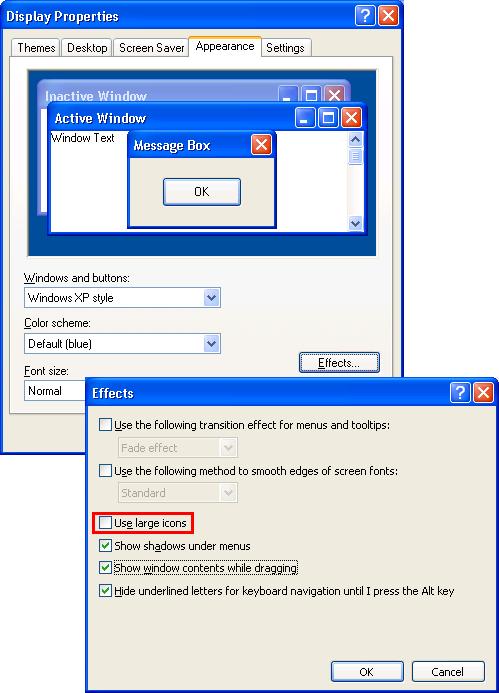
Download... moves out of the visible area. As the icon in not shown anymore, a download cannot be executed anymore. The size of the icons is also influenced by the option
Use large icons in the Windows operating system.
Possible diagnostics?
The arrangement of the symbols in the function area shows that the download symbol cannot be displayed anymore.
Short-term measures / recommendations?
Deactivate the option
Use large icons in the Windows operating system. In the operating system Windows XP you will find this setting in:
Settings>Control panel>Display
Register
Appearance
Button
<Extended>
Element
icon: size 32 or
Element
icon pitch (vertical): size 43
Evaluation:
According to default setting the option
Use large icons is deactivated in the Windows operating system. By deactivating this option or by modifying the icons' size and their pitch the function restriction can easily be avoided.