Determine the license number of Lenze software products

Question:

How can I determine the license number used by a Lenze software product?

Answer:

Actual EASY Engineering Tools

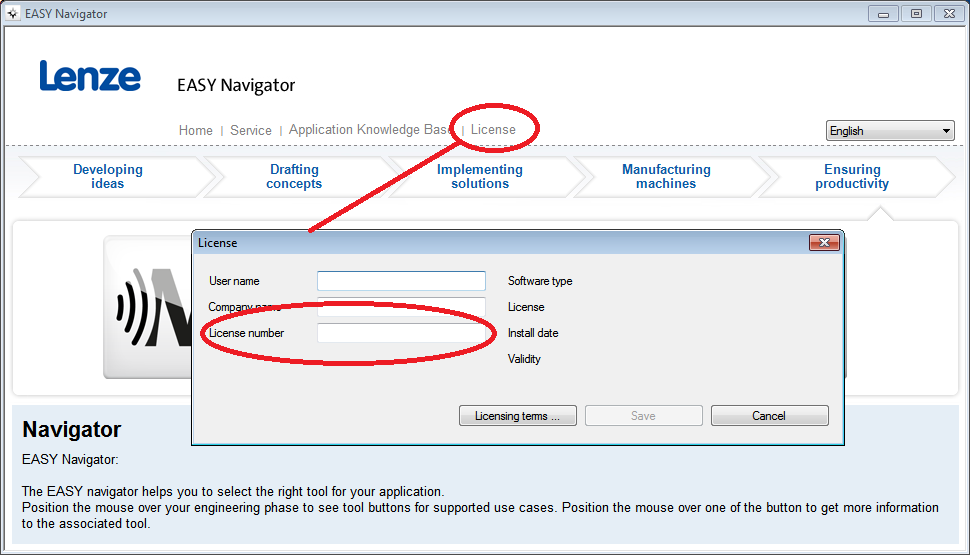
The license number of an EASY Advanced or EASY Professional license installed on the PC can be read in the license menu up to EASY Navigator V1.17 or a previous version.

From EASY Navigator V1.18 onwards, the installed license number is no longer displayed.


EASY License.png

Previous products

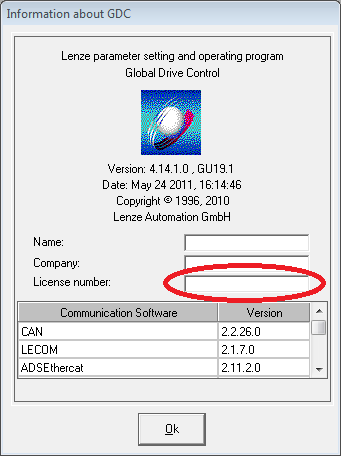
Some older Lenze software products display the license number in the info dialog (Help menu > Info), e.g.:

GDC License.png

To be allowed to use a license number, you must be the owner and holder of the corresponding license certificate.

If the license certificate has been lost and the license number cannot be determined, feel free to open a support request for the Lenze Service.


URL for linking this AKB article: https://www.lenze.com/en-de/go/akb/201500710/1/
Contact form