Runtime - Language: The fallback language is partially not displayed
Corrected from: EASY UI Designer V1.7.1
Behavior of the new version: Texts that have been deleted from the translation table are now replaced by the corresponding texts in the fallback language.
Description of behavior: If an entry of a language that was previously present is deleted in one of the translation tables in the EASY UI Designer, this text is no longer replaced by the fallback language in the visualization.
Conditions under which the behavior occurs: Text was present in the translation table and was subsequently deleted.
Affected products: EASY UI Designer V1.4.1
Short-term measures, Recommendations, Rating:
Open the following EASY UI Designer project file: *MyProject*_Client\*MyProject*_Client.vw7
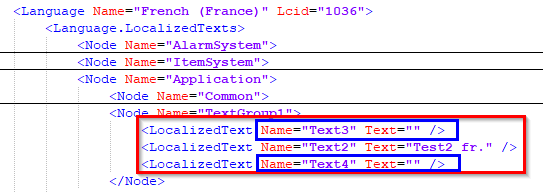
In this file you have to search for lines that look like this: <LocalizedText Name="Text1" Text= "" /> (The fallback language is not used because Text=“” is shown here). Example:
The following must be deleted from the line: Text= ""
The line then looks like this: <LocalizedText Name="Text1" />