What happens?
The c300 / p300 controller no longer starts.
The power LED lights up blue. A black background is visible on the p300.
When does this behaviour occur?
An update or a restore is performed.
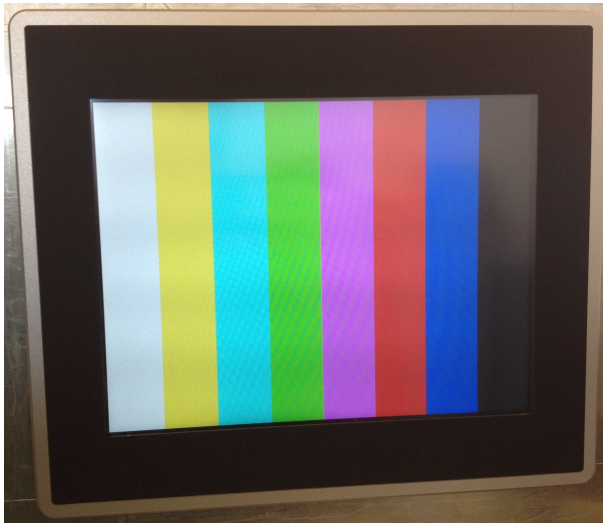
Shortly after mains switching, a test pattern appears on the p300.
When the controller is started, the eight-colour test pattern is displayed for a longer time. In this time, data is internally copied. This process may take up to one minute.
A c300 starts with delay.
In this phase, it is of utmost importance not to switch off the controller. Otherwise, the file system may be damaged.
Which products are affected?
All c300 /p300 controllers since the start of production.
Short-term measures:
Press the reset button at least 10s after mains switching (for instance by using a paper clip). A restore with an internal back-up image is performed.
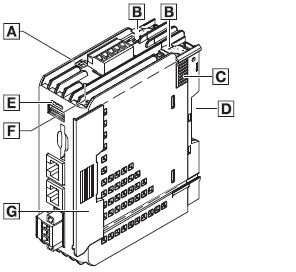
c300 keypad and display units
Reset button: F
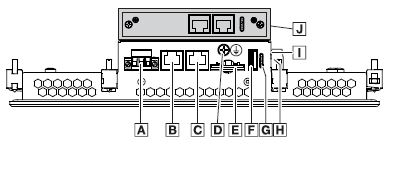
p300 keypad and display units
Reset button: I
Evaluation/recommendations:
The eight-colour test pattern that is displayed whenever the controller is started appears for <5s.
8-colour test pattern when starting a p300 with 10.4“ display
After a restore or an update, the controller must not be switched off in this state (several minutes) since this might lead to a defective file system.
The controller may only be switched off when the status LEDs indicate that the process has been completed.
Note: No change is planned for this behavior.