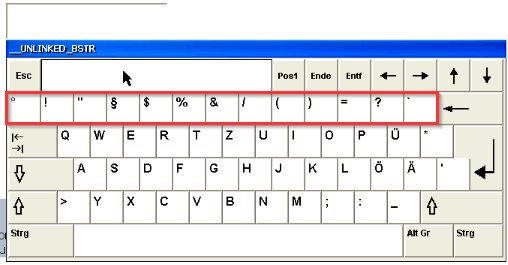
Corrected from:
VisiWinNET V6.5.4
Response of the new version:
The alphanumerical pad is scaled correctly.
If the FAlphaPad from the templates is already selected under the ClassName property of the alphanumerical pad, you do not have to change anything.
What happens?
Since VisiWinNET version 6.5.2, the alphanumerical pad provided via the touch keyboard component is no longer scaled correctly.
With a value > 1.0, e.g. 1.1, the numbers are no longer displayed on the alphanumerical pad (see screenshot).
Therefore, you can no longer enter any numbers.
When does this behaviour occur?
The behaviour occurs if you go to the KeySize property and select a value > 1 for the alphanumerical pad.
Which products are affected?
- VisiWinNET Smart 6.5.2 and 6.5.3
- VisiWinNET Professional 6.5.2 and 6.5.3
Short-term measures:
Add the FAlphaPad form from the templates to your project
and enter the name FAlphaPad in the touch keyboard component under the "AlphaNumericalPad" properties in the "ClassName" property.
After this, the "FAlphaPad" template will be used at runtime.
This form is not concerned by the incorrect scaling.