Which products are affected?
ESP-CAM1-P, ESP-CAM1-PU (CamDesigner Professional V2.3.4)
What happens?
The CamDesigner Professional crashes when the dialog for activating the software is called up (help menu
? =>
Registration) or when the software activation code is entered in the
Activation code field.
When does the problem occur?
The problem may occur if, instead of the hardware dongle, the CamDesigner menu item
? =>
Registration is used to activate the CamDesigner Professional software tool.
Possible diagnostics?
The behaviour may occur if the CamDesigner Professional software tool is used.
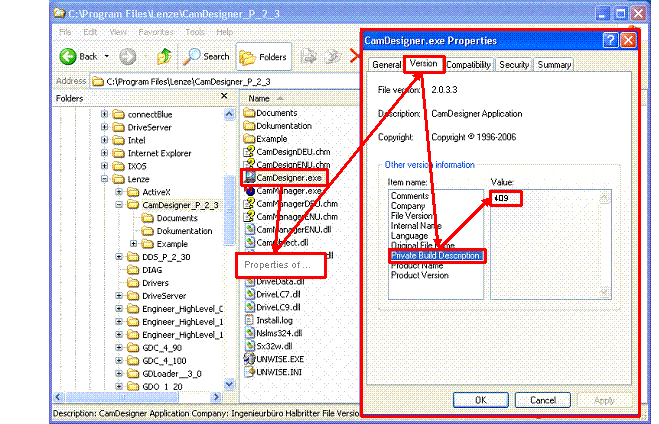
Proceed as follows in order to find out which CamDesigner Professional version is used:
1. Start the WINDOWS EXPLORER and open the main directory of the CamDesigner Professional V2.3 (e. g. C:
\Program files\Lenze\CamDesigner_P_2_3).
2. Via the
Properties menu item provided under the context menu (to be opened by selecting the
CamDesigner.exe file and pressing the right mouse button) the WINDOWS version number of the
CamDesigner.exe file can be found out.
If under the 'Private Built Description' item name of the 'Version' tab a version number smaller than 410 is indicated the behaviour described may occur when the software is activated.
Short-term measures/recommendations?
Only activate the CamDesigner Professional via the hardware dongle at the printer port (parallel port, LPT port).
If the PC/laptop does not have a parallel port the software can be activated manually via the CamDesigner menu item
? =>
Registration. However, as described before this way to activate the software may lead to the crash of the CamDesigner Professional and is therefore no reliable method to activate the software.
Evaluation:
The copy protection of the CamDesigner Professional is implemented via the hardware dongle connected to the parallel port. However, especially new PCs/laptops are no longer equipped with a parallel port. As a result, the dongle cannot be attached. In this case, the process in order to activate the software as described before represents an applicable alternative.
However, due to the function restriction described this alternative does not work reliably. The function restriction always immediately occurs if the software is activated manually via the CamDesigner menu item
? =>
Registration and is therefore only a problem if the CamDesigner Professional is installed for the first time or re-installed.