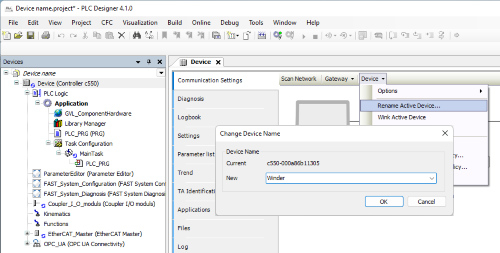
When delivered, a Lenze controller has a predefined device name consisting of the controller type and the MAC address of the onboard Ethernet interface, e.g.:
c520-000a86b4c655
This device name can be changed in 3 different ways;
The device name can be changed online using PLC Designer. To do this, use the 'Change Device Name' dialog (menu 'Device' > 'Rename Active Device' on the 'Communication' tab of the controller in the project). Please note that the device name in the device tree and the device name in parameter 0x2001:000 have the name 'Device'.
By changing the device name in parameter 0x2001:000. The change to the device name takes effect immediately after the parameter set has been saved in a power-fail-safe manner (device command 0x2022:003 = 1 Save parameter set settings). The parameter set can only be saved if there is a boot application in the controller.
By changing the name of the controller object in the device tree of the PLC Designer project. This automatically changes parameter 0x2001:000. After downloading the PLC project and creating a boot application, the device name takes effect.
The device name must not be longer than 50 characters. For compatibility reasons, a name with up to 128 characters can also be entered via parameter 0x2001:000. However, this is not recommended.
Included in the following products:
Controller c430 from V1.15
Controller c520 from V1.15
Controller c550 from V1.15
Application
The device name is a key requirement for communication to uniquely identify devices. This extension allows the device name to be configured not only using the PLC project and the PLC Designer, but also by changing a parameter, e.g. using the EASY Starter.