Remedied from:
8400 HighLine SW V2.00 onwards
Behaviour of the new version?
The above-named software version rectifies this functional restriction.
Which products are affected?
8400 HighLine SW ≤ V1.00
What happens?
As parameterised in the default setting, there is no error message generated when the hardware limit switches are overtravelled.
When does the problem occur?
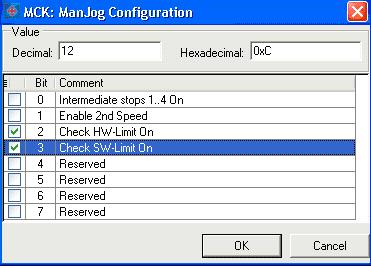
If in the 'Table positioning' application the default setting of the Motion Control Kernel' (MCK) – parameters is used (L-C01230: Bit 2 and 3 = FALSE) and if the operating mode 'ManulJog' is activated, the hardware limit switch monitoring is permanently switched off in the 'Positioning', 'Homing', and 'Follow speed' operating modes, too.
Possible diagnostics?
Check if the bits 2 and 3 under code L-C01230 are set to FALSE.
Short-term measures/recommendations?
Activate the hardware limit switch monitoring in the 'Motion Control Kernel' – ManualJog Configuration (L-C01230: Bit 2 and 3 = TRUE).
Evaluation:
Monitoring functions are usually checked during commissioning and safety measures are taken in order to avoid property damages. This function restriction can be eliminated by applying the recommendations mentioned before.
Published with service message No. 2009/02