POS-TP, re-enable TP saving asap

Question:

How can the Save touch probe function be re-enabled as soon as possible and what must be observed?

Answer:

Touch probe saving (FB POS-TP is part of POS) is activated using a rising edge at the function block input 'POS-TPx-ENABL'. The HIGH signal must be applied to input POS-TPx-ENABL as long as the touch probe is to be active. During this time, the touch probe (TP position in VTPOS) can be saved once by the touch probe signal.
After the TP has been saved, a rising edge at input POS-TPx-ENABL is necessary to reactivate TP saving.

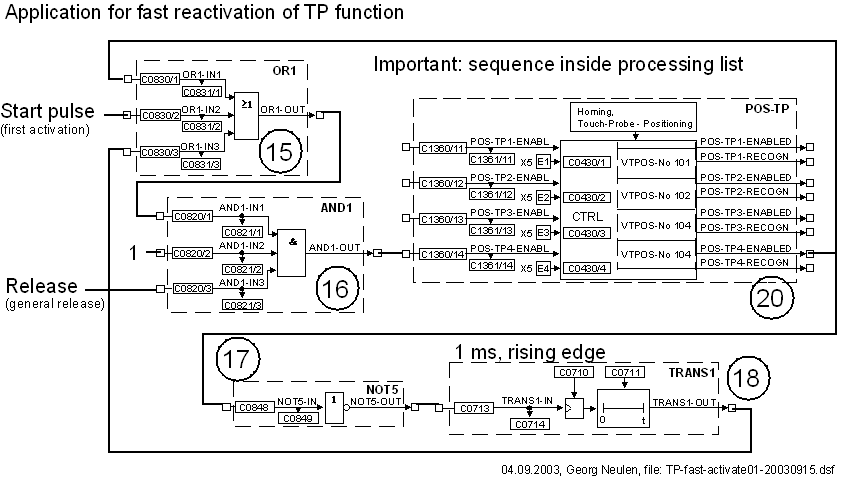
If the TP is to be re-enabled as soon as possible after the saving, two status signals of the POS-TP can be used to generate the required rising edge automatically by function block links:
  • Output POS-TPx-RECOGN is set if the touch probe is recognised. An additional delay of one cycle (1 ms) must provided (e. g. using DIGDEL) for the edge generation of TPx-ENABL. Otherwise the saved TP position is not transferred to VTPOS.
  • Output POS-TPx-ENABLED is immediately reset if a TP has occurred even if the input signal TPx-ENABL is still active. This signal can also be used to generate the edge at TPx-ENABL without providing a delay.

It is recommended to use output TPx-ENABLED e. g. with the following circuitry:

URL for linking this AKB article: https://www.lenze.com/en-de/go/akb/20035814/1/
Kontaktformular