i750: Retrofit i700 dual-axis unit: Possible procedure for taking over the parameterisation from the predecessor unit series, as far as possible
Question:
How can the parameterisation be transferred from a dual-axis unit of the predecessor unit series i700 to a dual-axis unit of the Servo Inverter i750?
Answer:
The double-axis units of the new i750 Servo Inverter and the predecessor i700 unit series differ with regard to the parameters, in particular the parameters for axis B.
Background:
The i700 double-axis devices are only managed as one EtherCAT device, which is why there are different indices for the parameters of axis A and axis B. The parameters for axis A and axis B are different. In the new i750 series, on the other hand, the double-axis devices are integrated into the EtherCAT as two participants, so that axis A and axis B can each be handled like single axes. This new configuration offers advantages when handling the parameters and programming the PLC application in the higher-level controller.
The parameter sets of the i700 double axes, stored as *.gdc files, cannot be transferred directly to i750 double axis units for this reason.
To transfer the parameters from i700 axis B to an axis of the i750 series, the diversions via the parameter export as single axis is required.
Important:
In any case, when importing i700 parameter sets (*.GDC), it must be assumed that the transfer will not work completely. This is because the number of parameters of the i750 is greater than that of the i700 and because individual parameters may differ in data format, value range, etc.
Possible procedure for transferring the parameterisation (as completely as possible) via Easy-Starter (or PLC-Designer):
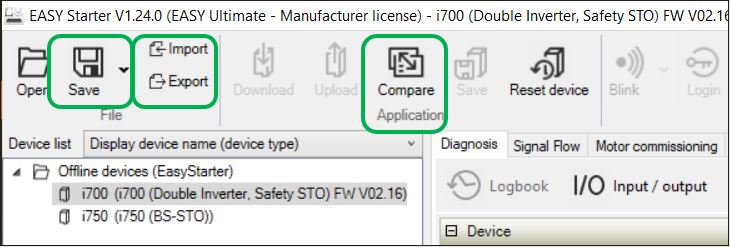
Export function (Export or Easy-Export):
Save parameters of i700 axis A and axis B separately as a single *.gdc file.
Import function (Import or Easy-Import):
Import parameters from previously saved *.gdc file into i750 axis A or axis B or into an i750 single axis.
The message window will point out differences in the parameter sets. However, import the parameters anyway in order to take over as much as possible.
Only Easy-Starter (compare):
Then use the function for comparing parameter sets to compare the current settings in the i750 with the imported *.gdc file and, if necessary, rework settings that have not been adopted.
Tip: Set the filter in the result list to "Transfer not possible". Only the affected parameters will then be displayed.