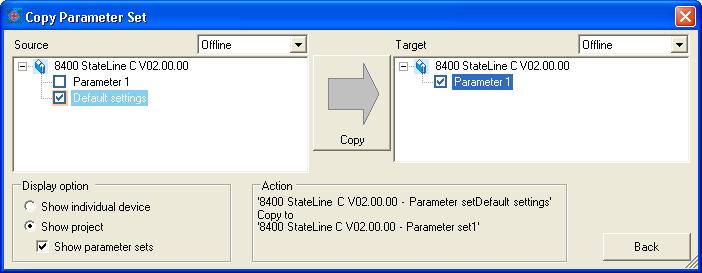
L-force «Engineer», loading the Lenze setting in offline operation

Question:
How can the Lenze setting be loaded in the L-force «Engineer» in offline operation?

Answer:
Proceed as follows to load the Lenze setting in the L-force «Engineer» in offline operation:
  • Select 'Application data' - 'Copy parameter sets...' in the menu bar of the L-force «Engineer».
  • The 'Copy parameter set' window appears.
  • Select the controller used as source on the left-hand side of the 'Copy parameter set' window (e. g. 8400 StateLine C V02.00.00) and activate the 'Default setting' checkbox.
  • Select the controller in your Engineer project into which the Lenze setting is to be loaded as target on the right-hand side of the 'Copy parameter set' window (in this case, e. g. 8400 StateLine C V02.00.00). Activate the checkbox of the corresponding parameter set which you want to overwrite with the Lenze setting (e. g. 'Parameter set 1').
  • Click the 'Copy' button in the middle of the 'Copy parameter set' window.

Note:
In offline operation, it is not possible to load the Lenze setting via code L-C00002/1=1 (8400) or C00002 = 0 (9400). This code is only a command which activates the loading of the Lenze setting in the frequency inverter. The command cannot be used to load the Lenze setting into the L-force «Engineer» project.

URL for linking this AKB article: https://www.lenze.com/en-de/go/akb/200804049/1/
Contact form