 Question:
How can the user set the default display for the keypad 9371BB/BC?
Answer:
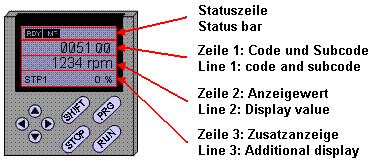
When the 9371BB/BC keypad is attached on the base device according to the Lenze standard in line 2 the current speed / frequency (C0051/000) is displayed. Line 3 additionally shows the device utilisation (C0056/000). The display values for both lines can be set by the user as follows:
Operating display in line 2:
The display in line 2 can be set via the first user menu configuration code (C0517/001). The integer of the value parameterized in C0517/001 indicates the code, and the two decimal places indicate the subcode number.
Example: After initialisation in line 2 keypad 9371 is supposed to display the current error number of C0168/001. Consequently, in C0517/001 a value of 168.01 is to be entered.
Operating display in line 3:
The display in line 3 is determined by means of code C0004/000. As this code does not permit decimal places to be entered, in line 3 only codes
without subcode numbers can be selected. If for the code selected in C0004/000 there are subcodes, the first subcode is generally displayed.
Example: After initialization in line 3 keypad 9371 is supposed to display the intermediate circuit voltage of C0053/000. Consequently, in C0004/000 a value of 53 is to be entered.
