TP window C1330 when TP positioning in the 9300EP, mode of functioning

Question:
Which effect has the touch probe window of the 9300EP positioning controller?

Answer:
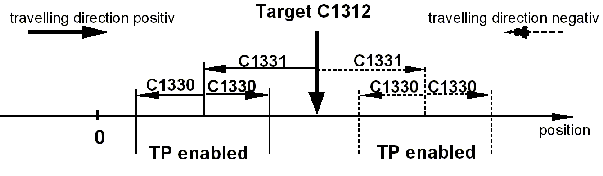
The touch probe window is a parameter for the touch probe positioning. Via code C1330 within the program sets (PS) a variable is selected from the VTPOS that determines the corresponding window width in [units]. In the default setting the touch probe input is evaluated over the entire travelling area (touch probe window C1330 = 'entire travelling area'). Thus, the touch probe positioning reacts in default setting directly on the next touch probe signal.
If the application is supposed to react on a later touch probe signal the enable area of the touch probe input can be limited in order to select a certain brand.
The enable area of the touch probe input is limited by the following parameters of the touch probe positioning in the PS:
  • C1312  'Target'
  • C1331  'TP distance'
  • C1330  'TP window'

The enable area is always in front of the target (to the travelling direction each). The window centre is determined accordingly by the target, deducted by the touch probe distance. The touch probe window is created around this centre to both directions - the enable area for the touch probe signal actually is twice the value for the touch probe window.

Via status-output POS-TPx-ENABLED = 1 it is indicated, when the touch probe is enabled and can influence the touch probe positioning.

The following diagram shows how the three parameters determine the enable area:

URL for linking this AKB article: https://www.lenze.com/en-de/go/akb/200501773/1/
Contact form