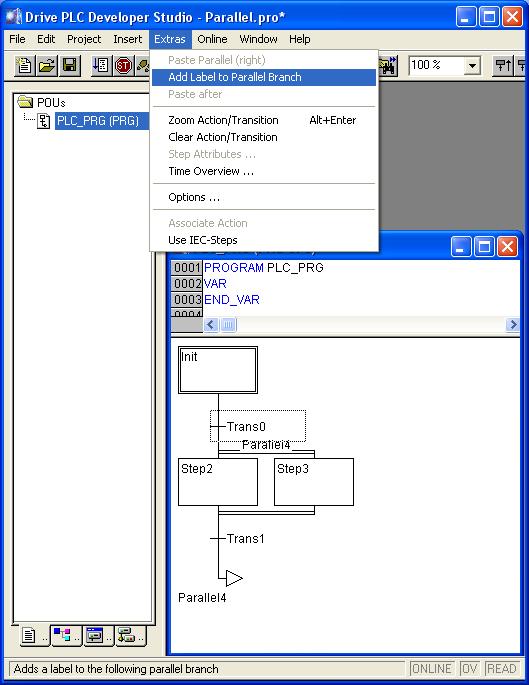
Jump labels for parallel branches in sequential function chart of DDS
Question:
Can a jump label be assigned to parallel branches in sequential function chart (SFC), so that this parallel branch can directly be activated?
Answer:
Yes, in order to assign a jump label to a parallel branch in the SFC editor of DDS, mark the transition directly in front of the parallel branch. The menu Extras --> Add Label to Parallel Branch enables you to assign a jump label to this parallel branch.
DDS gives automatically the name Parallel1, 2 etc. to the jump labels. You can edit this name.
The jump label can be eliminated by deleting the jump label's text.
Tip:
The step after a parallel branch will only be activated once the last steps of each parallel branch are active and the transistion condition after the branch is TRUE. It is not allowed to jump from or to a parallel branch. In the example shown below a jump to Step2 instead of label Parallel4 is not allowed.