 Application:
- Servo cam 9300: from software V3.0 on
- Online modification of the movement profiles of one or several cams.
Description:
In general, the data are stored in a PLC or IPC. This new function improves the other concepts regarding influence of profile data.
Alteration of single profile points:
It is possible to access to single profile points of the cam profiles via PLC or the parameter channel of a connected bus system by marking single digits.
Download of the motion profiles in one data block:
For the commissioning of series machines or the exchange of the total cam profile data there is the possibility to manage cam profiles product-related by download of the data blocks stored in the PLC.
For the firm ware versions 3.x a third method was created, which includes the advantages of the mentioned concepts. The access is simplified and clearer.
Incremental data entry
If the profile data have already been converted from units into increments in the external control, the increments will be transferred to the drive.
This transfer mode is preferable, if the calculation in the internal control can be carried out with more than 32 bit floating point routines.
Data entry in physical units
Data are transferred to the drive as units. In the drive, they are converted into increments.
Format:
- 4 decimal codes (fixed coma)
- The value must be multiplied has to by 10,000 before the transfer.
This transfer mode is preferable, if the calculation in the external control can be carried out with more than 32 bit floating point routines.
This way of transferring data should be used with, e.g., feed profiles, round tables, etc. (end value of the profile unequal the initial value of the profile).
Data field selection
Profiles in the background data field can be changed at any time because these profiles must always at first be transferred to the present data field for processing (with L->H – signal at the input CDATA-LOAD)
Profiles in the present data field should only be changed if they which are not processed presently (see output CDATA-ACTCAM).
Online change of number of points
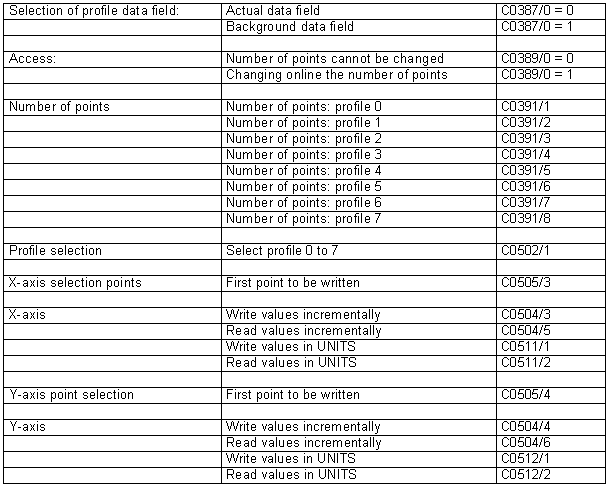
- Code C0389/0 must be = 1.
- Only profiles which have not been selected for processing can be changed.
Selection of points
Select the first point to be changed:
- X-values via C0505/1
- Y-values via C0505/1
The next higher point is automatically addressed after each write and read process (autoincrement).
It is possible to write or read all X-values before all Y-values. However, the values can also be written or read alternately.
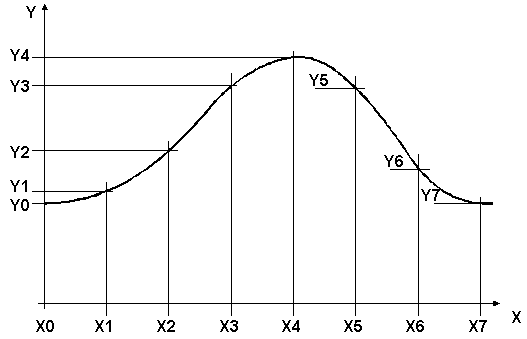
- X0 must always be = 0. All other values are rejected.
- Y0 is the initial profile point
Checking the X-axis
The X-axis must be stored in ascending order. If this is not the case, the drive can
- move in an uncontrolled way
- indicate an error (e.g. CCR-Trip).
In order to ensure the ascending order after the data transfer, the X-axis can be checked via code C0501/1. By sending a 0, the controller is will check the X-axis.
If the X-axis is correct, the controller will return the 'ACK'.
If the X-axis is faulty, the message 'INV_VALUE_RANGE' (error number = 13) will be returned. the faulty point is indicated by reading code C0501/1.
Procedure
1. Select data field.
2. Selection of the profile number (e.g. 0 to 7) with points that are subject to change under C0502/1.
3. Select the point to be changed under C0505/3 (X-values) or C0505/4 (Y-values), e.g. C0505/4 = 0 if the initial point of the Y-axis is to be entered or the complete Y-axis is to be written.
4. Write values, e.g. Y-values under C0504/4 (incremental) or C0512/1 (units).
5. After writing the value, it must be waited for the 'ACK'. Only then a new value can be written. If the drive controller sends the message ACK, the next point will be addressed automatically i.e. the next value under C0504/4 or C0512/1 will appear for point 1 after point 0 has been written.
Further information can be taken from the system manual concerning servo cam 9300 (chapter 5.8, motion profiles).