i950, c430, c5xx: Establish PLC Designer connection via ProfiNET

Question:
How can I use PLC Designer to establish an online connection to the PLC in a servo inverter i950 or a c5xx controller via ProfiNET?
 
Answer:
The devices cannot be accessed via "Browse Network" using the ProfiNet interface.
The following describes how to establish a connection via ProfiNET.
The ProfiNET IP address of the device must be known.

Classic communication dialog

  • Select the device in PLC Designer.
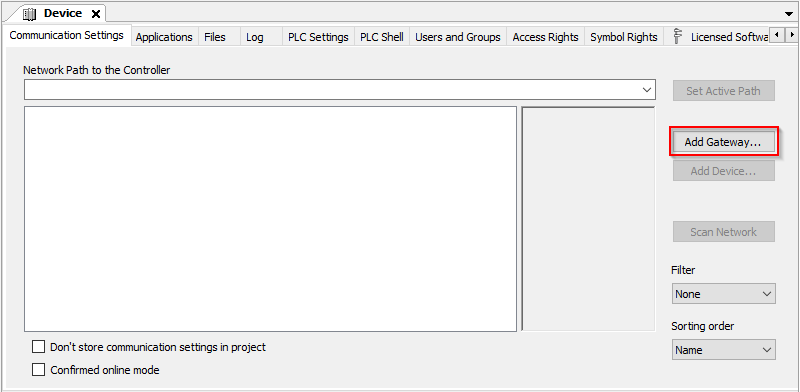
  • On the "Communication" tab, a new gateway is created (Add Gateway) or an existing one is modified (Edit Gateway).
    SS01_EN.png
  • Double-click on the gateway to open the settings.
    Enter "localhost" as the IP address here.
    SS02_EN.png
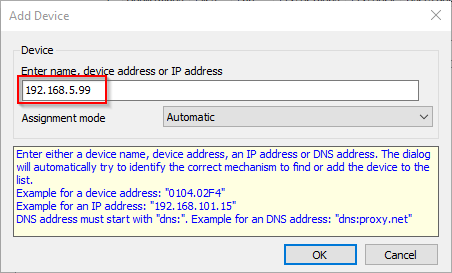
  • Now manually(not via the search function) (Add device).
  • The IP address of the device's ProfiNET interface must be set here.
    SS03_EN.png
  • Now a connection can be established from the PLC Designer 6667px;">can now be established to the device via the ProfiNet interface.
Simple communication dialog
The IP address = localhost is used as the gateway.
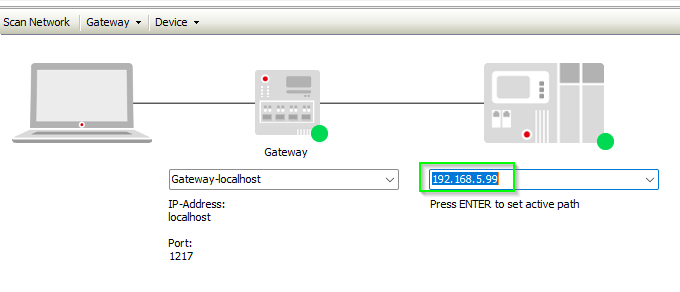
The Profinet IP address is entered manually in the input field below the image of the control.

Simple_Dialog.png


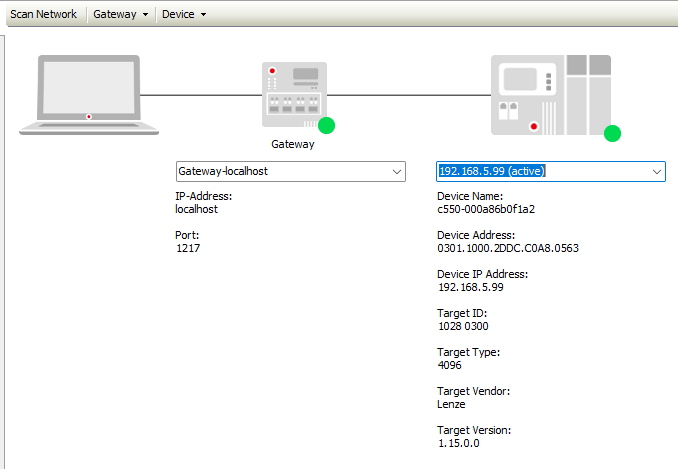
The control data is then displayed below the IP address and you can log in with the PLC Designer:

Simple_Dialog2.png

Please note:
The IP address of the PC must be in the same IP subnet as the i950 or c5xx.
[Automatic Translation]

URL for linking this AKB article: https://www.lenze.com/en-de/go/akb/202200293/1/
Contact form