Which products are affected?
ESPLV01XA0FC1 (Prepared Solution Flying_Saw V1.0)
What happens?
The motor data assistant included in the Global Drive Control (GDC) software is used to select the motor. If English has been selected as language for the GDC software the motor data assistant crashes when the corresponding motor parameters are entered. As a result, the motor is not selected.
When does the problem occur?
The problem occurs whenever English has been selected as language for the Global Drive Control (GDC) software and the motor data assistant is used to parameterise the motor connected. In case of the Prepared Solution Flying_Saw the device description file (pdb) 'FlyingSawSPLCV0100_1.pdb' is loaded as basis. The response described above occurs in combination with the specific PDB mentioned before.
Possible diagnostics?
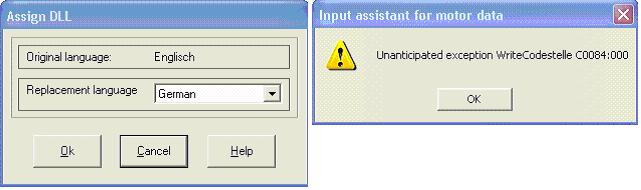
In GDC a dialog called 'Assign DLL' is opened. This dialog is a hint on an incorrectly loaded DLL. Another dialog informs that the corresponding codes for setting the motor parameters cannot be written. Both dialogs are shown below.
Short-term measures/recommendations?
The GDC motor data assistant can be used in combination with the basic device description file (e. g. ServoPLC 9300). For this, the basic device description for the corresponding target system is to be selected in the drive window. The device description for the Prepared Solution can be selected after the motor has been parameterised.
Evaluation:
The crash of the motor data assistant is detected during commissioning of the machine at the latest. The motor data assistant for setting the motor parameters can be used when the short-term measure / recommendation mentioned before is applied.