Corrected from:
PLC Designer V3.16
Application Template Standard project template V3.16
Response of the new version:
When the context menu command 'Create ACD Slave Access' is executed, the ACD channel between the slaves is created without error message.
What happens?
The following message appears when executing the context menu command 'Create ACD Slave Access':
The needed comment '/// ---------- ACD SLAVES ACCESS START - DO NOT CHANGE !------' was not found in 'MFB_xxx'
When does this behaviour occur?
The described behaviour occurs when using the L_FAST_Standard project template (Application Template Standard) supplied with PLC Designer V3.15.0.
Which products are affected?
PLC Designer V3.15
Application Template Standard project template V3.15.0.2
Short-term measures:
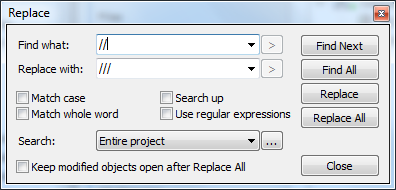
Replace all // comment characters by /// (menu command 'Edit > Find/Replace > Replace').
Evaluation/recommendations:
The 'Create ACD Slave Access' menu command in the context menu of the 'A70_MachineModuleSources' folder is used to create the ACD channel between the machine modules. The ACD channel is used for data exchange between the individual machine modules. Due to the above function restriction, the required ACD channel can no longer be created.