Sala de redacción
Notas de prensa
Novedades
Blog
Ferias y eventos
Boletín de noticias
Ofertas de trabajo
Ofertas de empleo
Descargas
Aplicaciones de ingeniería
Datos de ingeniería
Herramientas de ingeniería
Artículos de productos de la Application Knowledge Base
Documentación del producto
Certificados y declaraciones
Online Tools
EASY Product Finder
Dimensionar el accionamiento
Diseñar la máquina
CAD Configurator
Características M-n
Smart Conveyor Calculator
Contacto
Lenze en España
España (Spain)
Español
English
Change country
Productos
IIoT
Controladores
Convertidores
Motorreductores
Motores
Reductores
Accesorios
Engineering Tools
EASY System Designer
Engineering Tools
Lenze FAST Application Software
Lenze Selection
Soluciones
Sistemas
Nuestro hardware
X4 Remote
Motion Control
Automatización
Funciones de seguridad
Nuestro hardware
Nuestro software
Machine Visualization
SMART Engineering Apps
Nuestro software
Sistemas
Mecatrónica
Mechatronic Competence Campus
Decentralized Drive Packages
Energy efficiency
Smart Conveyor Story
Mecatrónica
Etiquetado de marcas
Sectores
Industria del automóvil
Referencias
Industria del automóvil
Producción de baterías
Industria del converting y las artes gráficas
Referencias
Industria del converting y las artes gráficas
Unidades de lavado de vehículos
Logística aeroportuaria
Vidrio, piedra y cerámica
Mecanizado de la madera
HVAC-R
Tecnología de refrigeración y bombas de calor
Ventilation equipment
HVAC-R
Industria del plástico
Courier Express Parcel
Logística de almacenes
Soluciones para transelevadores
Logística de almacenes
Mecanizado de metales
Pumps
Robotics
Industria textil
Referencias
Industria textil
Industria del embalaje
Referencias
Industria del embalaje
Sectores
References
Converting and printing industry
BST
Donghang Graphic Technology Inc.
DURST Group
D.W. Engineers
GIC
MAAN Engineering
Mendel RG Systems
Nikelman Printing press
Relinquo Automation Pvt. Ltd.
Suddha Machineries and Industries PVT LTD
Converting and printing industry
Airport logistics
Courier, Express & Parcel
Warehouse logistics
bonArea
Stöcklin High-bay warehouse
Vectron
Witron Warehouse logistics
Warehouse logistics
Textile industry
Dilmenler
Gilbos
MBK and DMS Dilmenler
Menzel Compact washer
Monforts Textile machine
Nomaco Nonwoven machines
nsc.n schlumberger
Picanol Weaving machines
Pro-SMH
Texpro
Trigema and Xetma Vollenweider
Zimmer Austria
Textile industry
Packaging industry
Citus Kalix Packaging machine
DMK
Fricke Abfülltechnik
Kletec Egg processing machines
MAKRO MAKINA
Mondini
PAYPER
TechNikkels
Wolf Packaging machines
XOX Retrofit extruder
Packaging industry
Further industries
Bauer
HEGLA New Technology
KABTEC Test systems
Lisec
MFL
Schelling Sawing center
Weinig Grecon
Further industries
References
Soluciones
Servicio técnico
Servicio posventa
Formación
Formación presencial
Aprendizaje online
Formación online
Formación
Servicio de ingeniería
Performance Partner Service
Cyber Security
Cyber Security Statements
Cyber Security
Descargas de software
EASY Engineering Tools
Engineering Apps
Datos de ingeniería
Descargas de software
Knowledge Base
Application Knowledge Base
Documentación del producto
Documentación de la empresa
Knowledge Base
Product-Lifecycle-Management
X4 Remote Support
Servicio técnico
Asistencia
Empresa
Grupo empresarial
Nuestro enfoque
Compromiso de calidad
Industria 4.0
Nuestro enfoque
Nuestra responsabilidad
Responsabilidad por los empleados
Compromiso social
Nuestra responsabilidad
Nuestra cultura empresarial
Nuestra dirección
Nuestra historia
History Lenze
100 years Elisabeth Belling
Nuestra historia
Grupo empresarial
Presencia global
África
Lenze en Sudáfrica
África
América
Lenze en Brasil
Lenze in Canada
Lenze en México
Lenze en EE. UU.
América
Asia
Lenze en China
Lenze en la India
Lenze en Corea
Lenze en Filipinas
Lenze en Singapur
Lenze en Turquía
Asia
Europa del Norte
Lenze Dinamarca
Lenze en Finlandia
Lenze en Suecia
Europa del Norte
Europa Occidental y Central
Lenze en Bélgica
Lenze en Alemania
Lenze en Estonia
Lenze en Francia
Lenze en Letonia
Lenze en Lituania
Lenze in Austria
Lenze en los Países Bajos
Lenze en Polonia
Lenze en Suiza
Lenze en el Reino Unido
Europa Occidental y Central
Europa del Este
Lenze en Bulgaria
Lenze in Macedonia
Lenze en Rumanía
Lenze en Rusia
Lenze in Serbia
Lenze en Eslovaquia
Lenze en Eslovenia
Lenze en la República Checa
Lenze en Hungría
Europa del Este
Europa del Sur
Lenze en Italia
Lenze en Croacia
Lenze en Macedonia
Lenze en España
Europa del Sur
Presencia global
Sustainability
Cumplimiento
Sala de redacción
Notas de prensa del Grupo Lenze
Novedades
Blog
Ferias y eventos
Boletín informativo
Sala de redacción
Ofertas de trabajo
Ofertas de empleo
Vacantes Alemania
Current vacancies in Poland
Current vacancies Benelux and UK
Current vacancies Switzerland
Current vacancies USA
Current vacancies China
Ofertas de empleo
Somos Lenze
Ofertas de trabajo
Global Procurement
Empresa
España (Spain)
Español
English
Change country
Home
Application Knowledge Base
Artículo
Design Time: Complete Deinstallation
Design Time: Complete Deinstallation
Question:
How can I remove EASY UI Designer "COMPLETELY" from my PC?
Answer:
The following steps must be performed to remove any remaining fragments of an EASY UI Designer installation from the PC:
perform "normal" uninstallation of the individual components:
Delete folder "EASYUIDesigner" and "VisiWin 7" under C:\Program Files (x86)\Lenze
Delete folder "INOSOFT GmbH" under C:\ProgramData
Delete folder "INOSOFT GmbH" under C:\ProgramData\Lenze
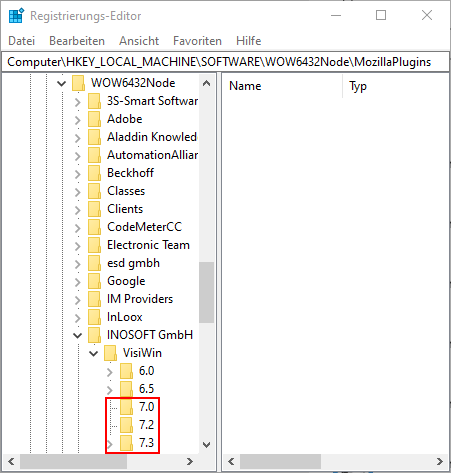
In the registry folder structure "Computer\HKEY_LOCAL_MACHINE\SOFTWARE\WOW6432Node\INOSOFT GmbH\VisiWin" delete all subfolders starting with 7.
After the previously described steps have been performed, reboot the PC.
URL for linking this AKB article:
https://www.lenze.com/en-de/go/akb/202200368/1/
Meta data
Taxonomy: EASY UI Designer
AKB-ID: 202200368
Last update: 2024/07/16
Category: FAQ, Tips and Tricks
Lenze reserves the right to change information on this page at any time. Any liability for the accuracy of the information is excluded.
©
Cambiar la ubicación
Aviso legal
Protección de datos
Condiciones de uso
Formulario de contacto