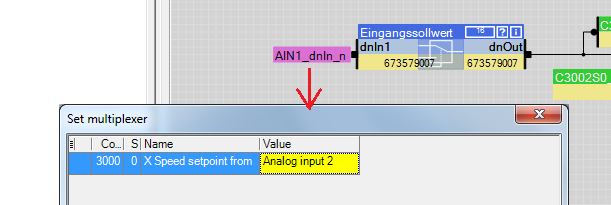
Corrected from:
Engineer ab V2.29 (no modification of the software intended)
Servo Inverter 9400 HighLine (no modification of the software intended)
Response of the new version:
No modification of the software and the described behaviour intended.
After uploading a project from the 9400 servo inverter, the multiplexers (purple flags) do not display the existing value, but the default setting which does not correspond to the configuration in the 9400.
In the 'Set multiplexer' pop-up dialog and in the parameter list, the correct values are displayed. If the user changes a multiplexer value, the new value is displayed correctly.
When does this behaviour occur?
The above-described behaviour may occur after uploading a project from a 9400 servo inverter HighLine if the FB editor of the project has not been enabled.
Which products are affected?
Engineer V2.29 and higher
9400 servo inverter HighLine
Short-term measures:
In order to display the multiplexer values correctly in the FB editor, proceed as follows after uploading the project from the 9400 servo inverter HighLine:
Go offline
Export the parameter values. Add the 'Multiplexer' menu group to your selection.
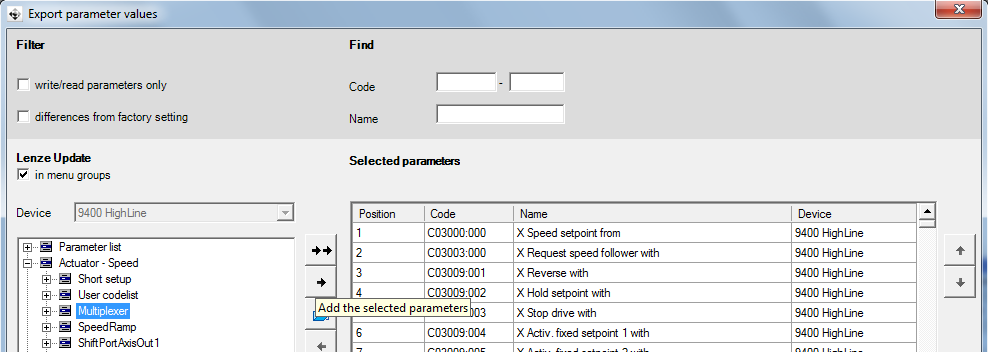
Import the file.
Go online again.
Evaluation/recommendations:
Due to the above function restriction, multiplexer values are not displayed correctly in a disabled FB editor. In the servo inverter, the configuration is executed correctly as originally configured.