Which products are affected?
Software Package - Positioner V3.1, Software Package - Positioner V3.3 and Software Package - Positioner V3.4
What happens?
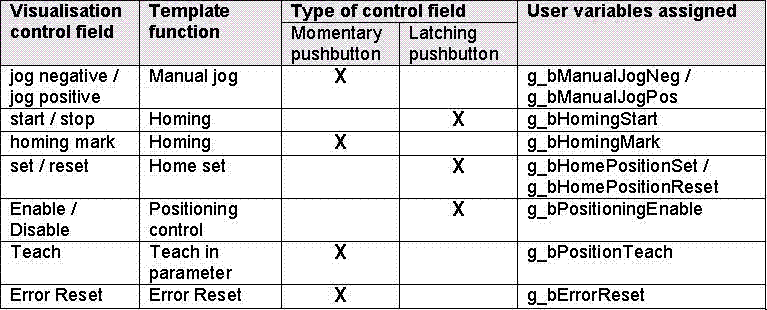
The template function cannot be used via momentary pushbutton or latching control fields in the DDS visualisation. The control fields do not accept the status change (transition) requested via mouse click. They seem to be overwritten from another position. Thus, a very short temporary change of colour can be observed when it is clicked on latching control fields. If momentary pushbutton control fields are activated by means of the mouse, a permanent change of colour (flickering between active and inactive) can be observed.
An overview of the control fields affected is attached below.
When does the problem occur?
If the user variables assigned are written in the user program or of the variables are connected to a digital input via a hardware addressing.
Since inside the template the control fields are combined with user variables it is written from two sides on the same target in case of a parallel operation via the visualisation.
If this write access takes places out of the user program, e. g. in an interval task, the requests are overwritten via the visualisation whenever the task is called.
Possible diagnostics?
During operation via the visualisation the status change (transition), which has been activated via the visualisation, can be observed in the user variable assigned. However, this variable should only change its status if it was assigned with TRUE or FALSE out of the user program.
Short-term measures/recommendations?
A parallel operation of the template functions mentioned before via the visualisation is not possible if the user variables are used. The internal combination between control field of the visualisation marks and the user variables cannot be revoked by the user.
Evaluation:
Usually the operation via DDS visualisation is only used for demonstration purposes and in case of commissionings. Independent of the user program the controller can be inhibited or put into the quick stop (QSP) status via the visualisation.