Cam, feedback with absolute value encoder

Question:
How can the absolute drive position of the absolute value encoder (single turn, multi turn, resolver) be integrated in the configuration of the cam drive?

Answer:
For the usage in applications with the electronic cam 9300 EK the drive position of the absolute value encoder must be imaged on the curve pulse (y axis). The pulse reference is to be established via function block CCTRL. The setting is made via function 'Set home position', see article 20010112.

After the function 'Set home position' has been executed the current position in the clock pulse of the y axis is assigned to the absolute value encoder with protection against mains failure. After mains connection the absolute position referred to the cam cycle of the y axis is shown at function block CCTRL (signal outputs CCRTL-PHI-ACT, CCTRL-PHI-SET2).

When the cam is applied in a limited traversing range with a cam cycle in the value range of the absolute value encoder, each position of the cam drive within the curve pulse is defined via the feedback system.

In case of applications with several encoder cycles via a curve pulse or in case of feed motions with encoder overrun, e. g. in applications with rotary tables, after mains connection the direct assignment of the curve pulse to the absolute value encoder in function block CCTRL is restricted. In order to realize this application please consider the following measures:
  • In order to recover the absolute position after switch on, the drive may generally not be rotated more than 1/2 of the encoder cycle when there is no voltage supply of the feedback system.
  • The position assignment of the signals CCTRL-PHI-ACT and CCTRL-PHI-SET2 does not correspond to the defined value range of the y axis after overrun of the curve pulse during operation. Therefore, the signals may not be used for arithmetic operations or other functions, e. g. coupling functions, which are supposed to be derived from the y axis.
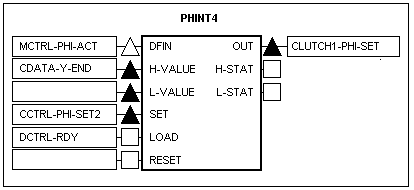
  • In order to represent the curve pulse in the y axis logically, function block PHINT4 can be added to the application according to the example shown below. When the drive is switched on and the y position is accepted by CCTRL-PHI-SET2, PHINT4 creates the curve pulse for the y axis of the drive dependent on the final value of the y axis (CDATA-YEND).


URL for linking this AKB article: https://www.lenze.com/en-de/go/akb/200406493/1/
Formulario de contacto