Question:
According to the template in the software package cam's default the limit switch signals are connected to the digital inputs E1 and E2. The default selection of the digital inputs is made in the global variables (tab <Resources>, file Global Variables/TemplateUserVariables/UserVariables) via the absolute addressing of the digital inputs E1 (absolute memory address %IX1.0.1) and E2 (absolute memory address %IX1.0.2).
Which modifications does the cam template require, when the cam template is to be applied without the evaluation of final switches (e. g. in case of feed axes like conveyors, rotary tables)?
Answer:
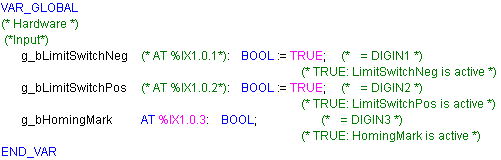
The adaptation of the cam template can easily be executed via the global user variables (file Global Variables/TemplateUserVariables/UserVariables):
1. Open the global user variables (file Global Variables/TemplateUserVariables/UserVariables).
2. Behind the variable name
g_bLimitSwitchNeg and
g_bLimitSwitchPos delete the declaration part of the absolute address ('AT %IX1.0.x') or eliminate this part.
3. Initialise the corresponding variable for the limit switch, which does not exist anymore, to a value of TRUE, so that the cam template generates no error message due to a supposed limit switch signal.
4. After successful modification the declaration part of the user variable should be similar to the one shown below.
In contrast to the familiar
9300EP positioning controller presentation style of a
TRUE signal when the limit switch is approached, as well as usage of the level inversion via codes C0114/00x (x = 1 ... 5) in the
cam template the l
imit switch signals are accepted
in the inactive status as TRUE (wire breakage protected). This is why these signals must be set to TRUE when the variables are initialised.