Corrected with:
Cabinet Controller c430 V1.15
Behavior of the new version:
If an SD card of a different controller type is inserted into the c430, the controller does not boot up completely (error LED flashes red) and no changes are made to the IP configuration. A text file on the SD card indicates the error and possible remedies.
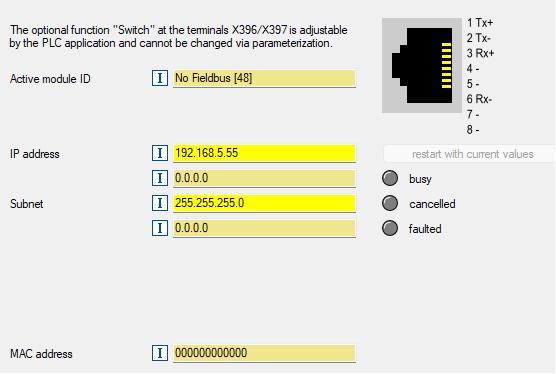
The MAC address 000000000000 is used for the X396/X397 interface when used as an Ethernet switch.
The Ethernet interface cannot be used in this case. No IP address or subnet mask can be set.
Conditions under which the behavior occurs:An SD card was used in the device that was previously used in a c520 or c550.
Affected products:
Controller c430
Short-term measures, Recommendations, Rating:
Follow these steps:
- Download the file c430.zip file from the attachment and unzip it. The file contains two directories ("firmware" and "plc").
- Switch off the controller.
- Remove the SD card from the controller to a PC
- Delete the directories "firmware" and "plc" directories from the SD card
- Copy the "firmware" and "plc" directories from the zip file to the SD card.
- Insert the SD card into the c430 and start it
- As long as the STA LED is lit, the controller must not be switched off.
After the restart, the firmware V1.14 is installed on the c430 and the MAC address is valid.
[Automatic Translation]