Fixed as of:
PLC Designer (V4.0 and later)
Behavior in the new version:
The values of variables in the network variable list (NVL) are displayed by PLC Designer.
Behavior Description:
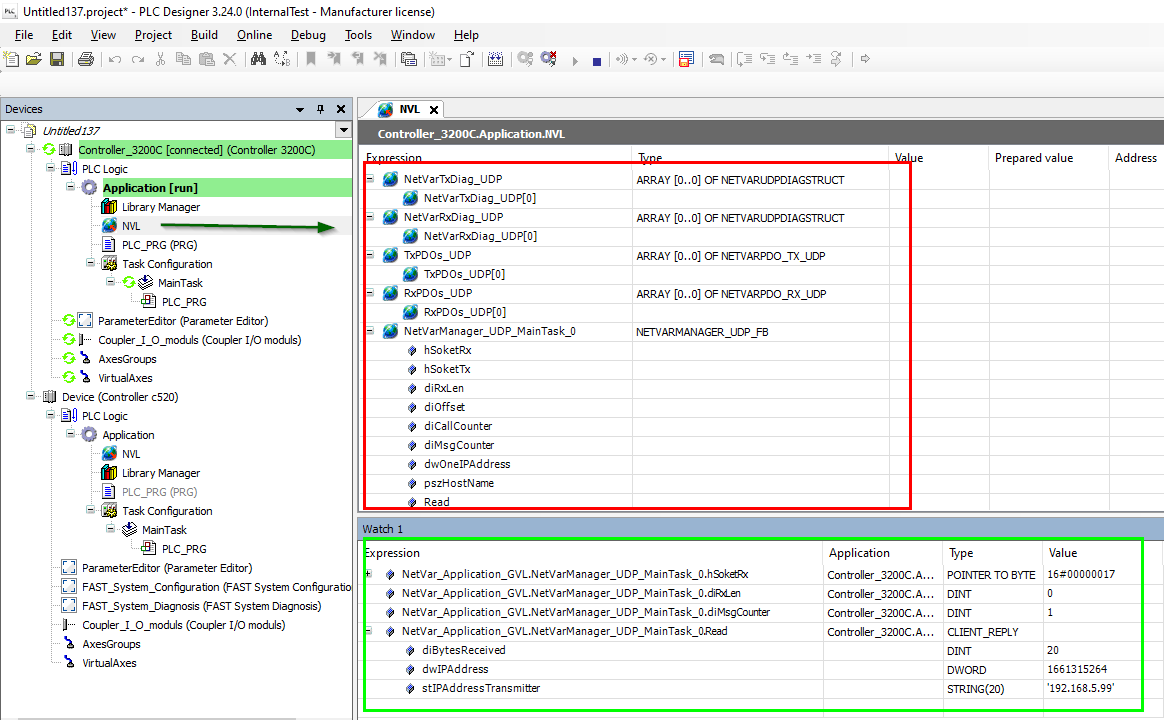
The values of variables in the network variable list (NVL) are not displayed by PLC Designer.
Under what conditions does this behavior occur?
This behavior occurs when attempting to monitor the values of implicitly generated variables in the network variable list using PLC Designer online.
Affected products:
PLC Designer version 3.24 and later
Short-term measures:
Use a monitoring list (Menu 'View' > 'Monitor' > 'Monitoring List x') to monitor the implicit variables.
The easiest way to do this is to drag and drop the variable structure from the NVL into the watchlist.
The variable elements can be used in the PLC application using the same syntax as shown in the watchlist.
Evaluation/Recommendations:
Network variable lists are used for data exchange between multiple controllers. Due to this functional limitation, the values of implicit variables in this network variable list cannot be observed directly online within the list. An application-specific solution is described under “Short-Term Measure.”
[Automatic Translation]